
This blog is a part 3 of a series of blogs about IFC authoring directly in a text editor. Previously we’ve written an IFC model where we’ve defined a project with spatial hierarchy (part 1), we’ve later added a physical element (IfcWall) and defined a simple geometry (part 2).
In this part we will be addressing semantic enrichment of our wall, giving it a material, quantities, properties and a classification.
Material
As you may have noticed, the material of a physical element is not defined on an attribute level, but is rather declared as its own entity, IfcMaterial, and then assigned via the relation IfcRelAssociatesMaterial to a physical object (instance or type).
IFCMATERIAL(Name,?Description,?Category)
Name : Name of the material
?Description : Definition of the material in more descriptive terms given by attributes Name or Category
?Category : Definition of the category of material, in more general terms than given by attribute Name.
To add the material, we will append the file with the following line.
#41=IFCMATERIAL('CONCRETE',$,$);
The IFC does support multi layer material construction through IfcMaterialLayerSet.
To assign the material to the wall, we will use the IfcRelAssociatesMaterial entity.
The graph below illustrate the required connections.
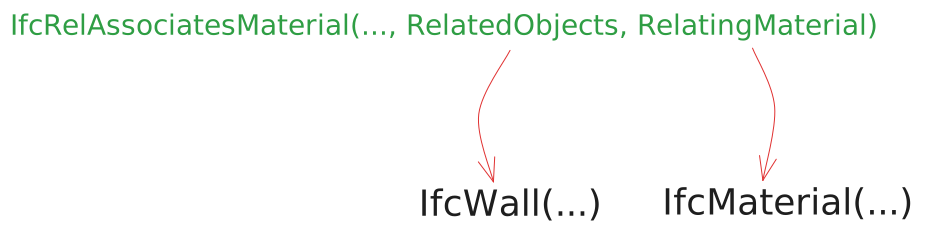
IFCRELASSOCIATESMATERIAL(GlobalId,?OwnerHistory,?Name,?Description,?RelatedObjects,?RelatingMaterial)
… view previous definitions
?RelatedObjects : This can point to various entity types, but in our case will be targeting the physical elements to which the material is to be associated to
?RelatingMaterial : The material to associate to the physical element.
#42=IFCRELASSOCIATESMATERIAL('2p34bAc255juYWkQtA_Slu',$,$,$,(#39),#41);
Quantities
Quantities are sets of derived measures of physical (IfcWall, IfcDoor…) or spatial (IfcBuilding, IfcSpace) elements.
Similar to a material, quantities are associated to physical elements through a relation entity.
For our example, we will be implementing quantities from a “standard” quantity sets defined within the IFC4 schema (see full list here).
Since we are dealing with a wall for our demonstration, we will be using some of the quantities from Qto_WallBaseQuantities quantity set.
The graph below illustrates the required entities and connections in order to assign quantity values to an IFC element.
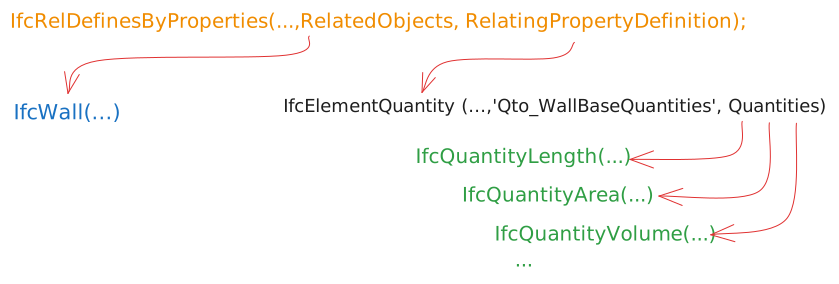
Individual quantities are defined using IfcQuantityLength, IfcQuantityArea, IfcQuantityVolume …
Let’s break down the first one, IfcQuantityLength, through which we will define the Length quantity of the wall. The geometry of the wall was defined in part 2.
IFCQUANTITYLENGTH(Name,?Description,?Unit,CountValue,?Formula)
Name : Name of the element quantity
?Description : Further explanation that might be given to the quantity.
?Unit : Optional assignment of a unit. If no unit is given, project unit is used
CountValue : Value of the quantity
?Formula : A formula by which the quantity has been calculated, for informational purposes only.
#59=IFCQUANTITYLENGTH('Length',$,$,5.,$);
Other quantities can be written similarly
#60=IFCQUANTITYLENGTH('Width',$,$,0.1,$);#61=IFCQUANTITYLENGTH('Height',$,$,3.,$);#62=IFCQUANTITYAREA('GrossSideArea',$,$,15.,$);#63=IFCQUANTITYVOLUME('GrossVolume',$,$,1.5,$);
Before being attached to an element, individual quantities are grouped in a quantity set using the IfcElementQuantity
#64=IFCELEMENTQUANTITY('0O422jvHHRKwhHTKmWGIrF',$,'Qto_WallBaseQuantities',$,$,(#59,#60,#61,#62,#63));
IfcRelDefinesByProperties is the relation entity through which elements can be given both property and quantity sets.
#65=IFCRELDEFINESBYPROPERTIES('30VwLSROT8iOd7aMTx0Nhs',$,$,$,(#39),#64);
Properties
Properties can be assigned through a similar mechanism as quantities, following the graph below.
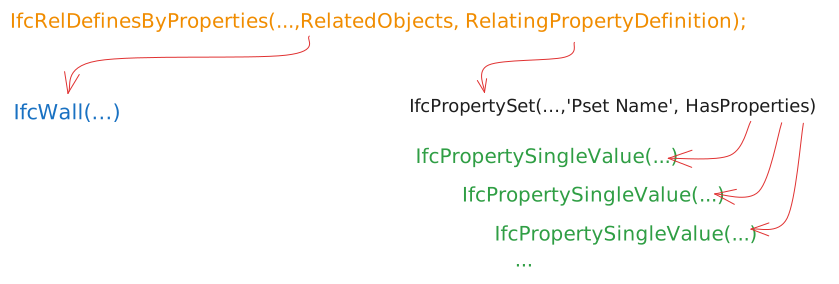
In our case, properties are given single values, hence IfcPropertySingleValue. But other complex value types are supported within the IFC schema.
We will be adding properties from the standardized property set Pset_WallCommon
#66=IFCPROPERTYSET('0O422jvHHRKwhHTKmWGIGH',$,'Pset_WallCommon',$,(#67,#68));#67=IFCPROPERTYSINGLEVALUE('IsExternal',$,IFCBOOLEAN(.T.),$);#68=IFCPROPERTYSINGLEVALUE('LoadBearing',$,IFCBOOLEAN(.T.),$);#69=IFCRELDEFINESBYPROPERTIES('30VwLSROT8iOd7aMTx0NPM',$,$,$,(#39),#66);
We will be also adding a custom property set with some personalized properties
#70=IFCPROPERTYSET('2RKwhHTKmWGIGH0O422jvG',$,'Custom_Pset',$,(#71,#72,#73));#71=IFCPROPERTYSINGLEVALUE('Property#1',$,IFCTEXT('value#1'),$);#72=IFCPROPERTYSINGLEVALUE('Property#2',$,IFCBOOLEAN(.T.),$);#73=IFCPROPERTYSINGLEVALUE('Property#3',$,IFCLENGTHMEASURE(12.),$);#74=IFCRELDEFINESBYPROPERTIES('1d7aMTx0NPM30VwLSRNT8i',$,$,$,(#39),#70);
Classifications
In IFC, a classification is used for the arrangement of objects into a class or category according to a common purpose or their possession of common characteristics.
The graph below illustrate one way of applying a classification to a wall.
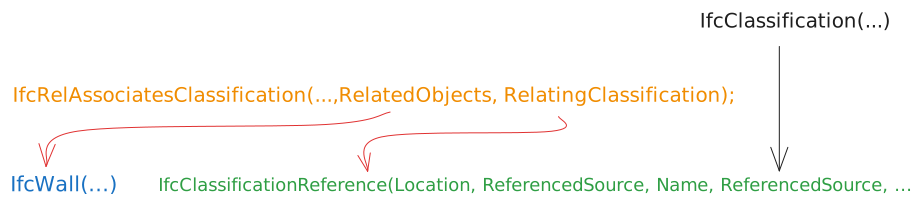
IfcCalssification identifies the classification system or source to which a classification reference refers to.
IfcClassification(?Source,?Edition,?EditionDate,Name,?Description,?Location,?ReferenceTokens)
?Source : Source (or publisher) for this classification
?Edition : The edition or version of the classification system
?EditionDate : The date on which the edition of the classification used became valid
Name : The name or label by which the classification used is normally known.
?Description : Additional description provided for the classification
?Location : Resource identifier or locator, provided as URI, URN or URL, of the classification.
?ReferenceTokens : The delimiter tokens that are used to mark the boundaries of individual facets (substrings) in a classification reference.
#75=IFCCLASSIFICATION('ASTM',$,$,'UNIFORMAT II',$, $, $);
IfcClassificationReference is a reference into a classification system or source (see IfcClassification) for a specific classification key (or notation).
IfcClassificationReference(?Location,?Identification,?Name,?ReferencedSource,?Description,?Sort)
?Location : optionally holds a direct URI link into the classification system (or source) to hyperlink the classification key
?Identification : holds the key provided for a specific references to classification items (or tables) := B2010
?Name : allows for a human interpretable designation of a classification notation
?ReferencedSource : The classification system or source that is referenced.
?Description : Description of the classification reference for informational purposes.
?Sort : Optional identifier to sort the set of classification references within the referenced source := $
For our example, we will be using the Uniformat II classification system.
#76=IFCCLASSIFICATIONREFERENCE($,'B2010', 'Exterior Walls', #75,$ , $);
Adding the line above concludes the writing of the IFC model.
Validation
The IFC Validation Service by buildingSMART International is a free online platform for validating IFC files. It can provide a judgment of conformity against the IFC standard (schema and specification) of a given IFC file.
Below are the results of the final version of our notepad authored IFC (see attached files section).
